
We have added a simple concept in OLab4 which has opened up a lot of new functionality for case authors.
For login credentials to test how this works, see below for some examples.
Role-Based Node Access (RBNA) is an extension of the concept of scoped objects and role-based access to scenarios. Adding this small capability allows us to do so much more.
RBNA allows us to lock the access to any particular Node in a Map, based on the user’s role. This means that the author can hide certain nodes or even whole pathways in a scenario. The Node does not even appear in the set of Links, and if the user tries to access that Node using a direct URI, their access is still prevented.
What does RBNA afford to authors?
This simple little function allows authors to provide functionality such as:
- additional tips or course notes for instructors
- guides for case reviewers
- design and debugging notes for case authors
- simplified pathways for learners
- shortcuts for session moderators to skip to their facilitated TTalks or other nodes
- group and role-based pathway access for Team-Based Learning (TBL)
Because of the DAG-based pathway structure of OLab, locking a single Node can help the case author to close off a whole area of a map, or to simply place a controlled gateway into those pathways.
Because this is tied to the role-based security, if an advanced author wants to create customized roles and pathways related to those roles, they can do this within the current structures. No bespoke programming is needed within the OLab architecture.
Can I see it in action?
We have created a simple map that illustrates how this works. Check out this map:
Test: Role-Based Node Access — however, if you go directly to this link, you will bypass the login and credentialling process so you will only see what an anonymous learner will see.
Depending on the level of access that you already have to OLab 4.6, various sections of this map will be visible. It is a very simple map layout so don’t expect great complexity in this one.
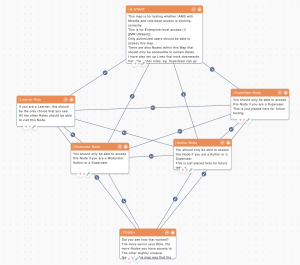
If you have superuser or author access, you should be able to see all of the map. If you are a moderator or a student, you will only be able to access certain Nodes. For those who do not have direct access to OLab 4.6, you can also explore this using our Moodle portal.
To try this out directly, use one of the following logins at https://player.olab4.net
Use the password ‘rbna’ for all of these logins.
- username = ‘rbna’ has learner level access and is in the ‘guest’ group
- username = ‘rbna2’ has learner level access and is in the ‘external’ group
These two learners mostly see the same thing but you will see that they can only access the secondary learner node that belongs to their group
- username = ‘rbna_author’ has author level access and is in the ‘guest’ group; they can see most nodes except for the nodes that are exclusive to superusers.
- username = ‘rbna_moderator’ has moderator level access and is in the ‘guest’ group; they can see most nodes except for the nodes that are exclusive to superusers and authors. A wee hierarchy. In OLab3, this was baked into the codebase. In OLab 4.7, this is table-driven and easy to modify on a case-by-case(!) basis.